[Site Name]
[domain_name]
(999) 999-9999
[address1]
[address2]
[City, State Zip]
The System Settings Page
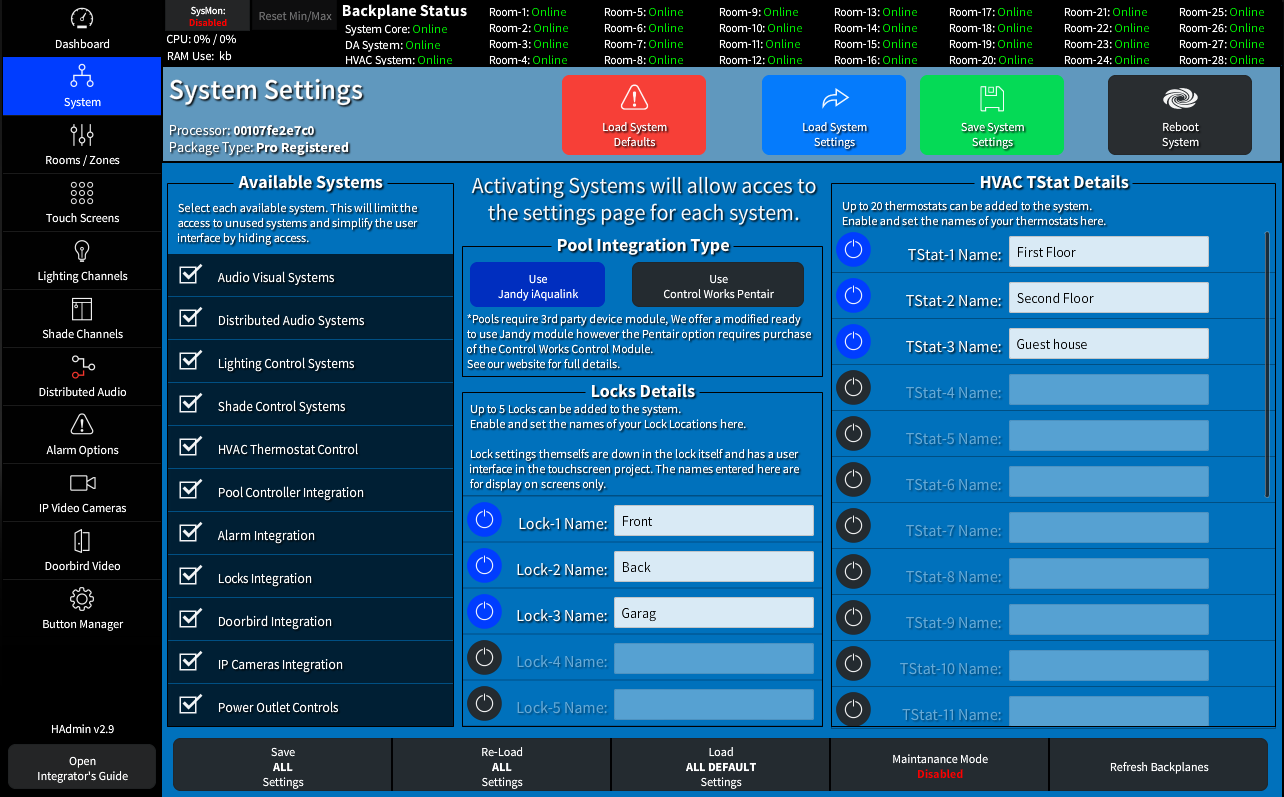
The System Settings Page allows activation of major systems.
Once a system is marked as 'Active' in the Available Systems List the configuration page button will be enabled and the icon on the user touch panels will become visible.
- Once the HVAC System is enabled you can activate and assign names for the up to 20 thermostats
- With the locks Integration activated you can activate and assign names for up to 5 locks.
This will also activate the interface on the User Touch Panels allowing for additional user based settings. - If the Pool/Yard controls are enabled then you will be able to choose your integration type.
We have a free version of the Jandy Aqualink Module that is included with our driver package.
The Pentair Integration requires the purchase of a 3rd party module from Control Works.
The Load and Save Bar

The Load and Save areas are the same on all pages and should be done for each system you modify. Once saved any system reboot will load the saved data. Here on the system page you also have a Reboot System button
The System Utilities Toolbar

The Utilities Toolbar at the bottom of the page gives you access to Save, Load and Reset All functions along with a Maintenance Mode button that will set all user touch screens as in-accessible so that configurations changes can be done without user input.